Spam analysis
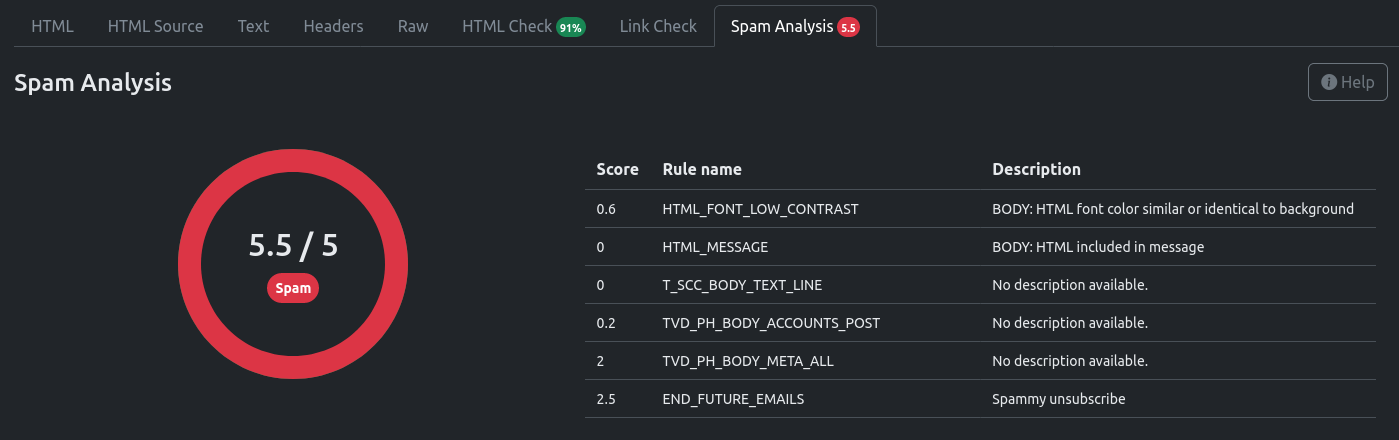
Mailpit can optionally integrate with SpamAssassin (both versions 3 and 4) to provide insight into the “spamminess” of your messages.
Each time Mailpit checks the scores for a message, it sends (posts) your complete message (including attachments) to a running SpamAssassin server and then displays the results returned by SpamAssassin.
Please refer to the configuration documentation to see how to enable SpamAssassin integration.
Notes on SpamAssassin
The default spam threshold is 5, meaning any score lower than 5 is considered ham (not spam), and any score of 5 or above is spam.
SpamAssassin will also return the rules that are triggered by the message. These rules can differ depending on the configuration of your SpamAssassin server. The total of this score makes up the “spamminess” of the message.
Mailpit does not manipulate the results nor determine the “spamminess” of your message. The result is what SpamAssassin returns, and it is entirely dependent on how SpamAssassin is set up and optionally trained.
This tool is simply provided as an aid to assist you. If you are running your own instance of SpamAssassin, then you should look into your SpamAssassin configuration. If you are using the Postmark service, then the results are what they are (you cannot change that).
For a list of default SpamAssassin tests run, please see this. The SpamAssassin report will only return tests triggered by the message.
Edit this page